Your email countdown timers, built from Claude
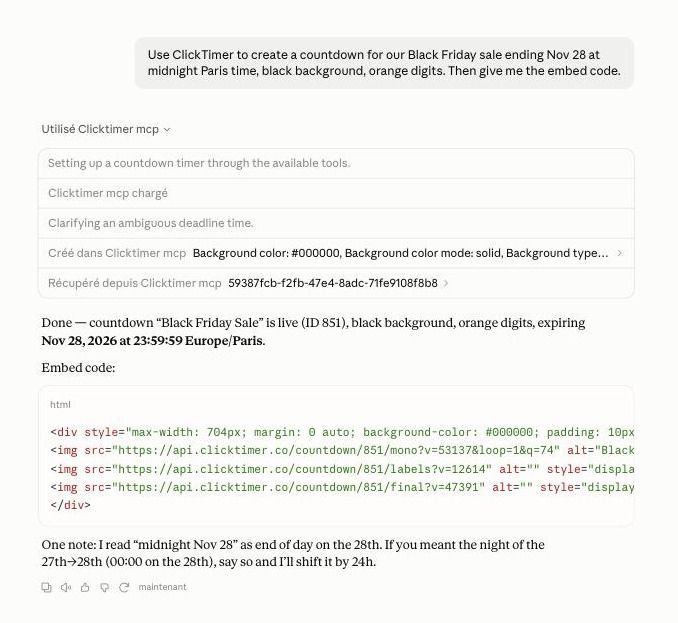
Describe your campaign. Claude creates the countdown, styles it to your brand, publishes it to Klaviyo and hands you the embed code. No switching tabs, no copying IDs.
One conversation instead of six tabs
End-to-end setup, in one conversation
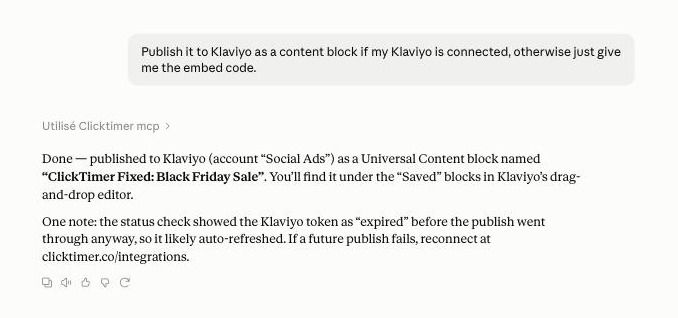
Describe the sale and the deadline. Claude creates the timer, sets your colors and fonts, publishes it to Klaviyo as a content block and gives you the HTML code for any other email platform.
Scheduled reporting and alerts
Connect a scheduled task and Claude checks in on its own: a Monday summary of impressions per timer, an alert when a timer is about to expire, a heads-up when your credits run low.
Prompts to copy into Claude
Paste one into a new conversation once the connector is added.
Create a countdown for our Black Friday sale ending Nov 28 at midnight Paris time, black background, orange digits.
Publish the Black Friday timer to Klaviyo as a content block, then send me a test email.
Change the end date of my launch timer to next Friday and give me the embed code.
Every Monday, summarize impressions per active countdown and warn me if my credits drop below 20,000.
Connect ClickTimer to Claude in 3 steps
- Add the connectorOpen ClickTimer in Claude’s connector directory and click Connect. It works on every Claude plan, Free included.
- Sign in to ClickTimerSign in (or create a free account) and approve access. Claude never sees your password.
- Optional: connect KlaviyoIn ClickTimer, go to Integrations and connect Klaviyo to publish timers straight to your account.
https://www.clicktimer.co/mcp. Authentication is OAuth. On Team and Enterprise plans, an Owner adds it in Organization settings > Connectors.You approve every action
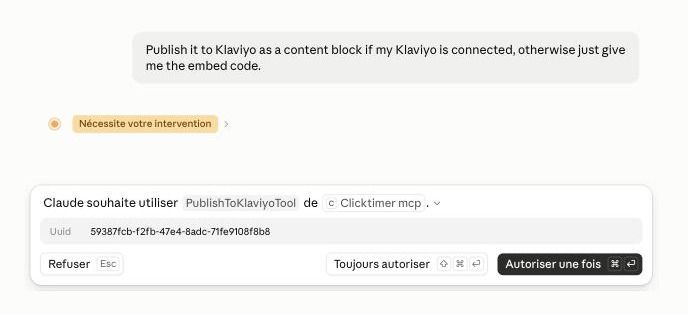
Claude shows you which ClickTimer tool it wants to use and waits for your OK before it changes anything.
The 14 tools Claude can use
Read tools only look. Write tools change something in your account, and Claude asks you first.
| Group | Tool | What it does | Access |
|---|---|---|---|
| Countdowns | Create countdown | Create a new countdown timer with your colors, fonts and end date | Write |
| Countdowns | Update countdown | Change any setting of an existing countdown, including the end date | Write |
| Countdowns | Delete countdown | Delete a countdown (soft delete by default) | Write |
| Countdowns | Get countdown | Get the full details of one countdown | Read |
| Countdowns | List countdowns | List your countdowns, filtered by status | Read |
| Countdowns | Get embed code | Get the HTML embed code for any email platform | Read |
| Analytics | Get countdown analytics | Impressions for a countdown over 7, 30, 90 days or all time | Read |
| Klaviyo | Get Klaviyo status | Check whether Klaviyo is connected, and how to connect it | Read |
| Klaviyo | List Klaviyo templates | List your Klaviyo email templates | Read |
| Klaviyo | Publish to Klaviyo | Publish a countdown as a Klaviyo Universal Content block | Write |
| Send test email | Send yourself a test email with the countdown (5 per hour) | Write | |
| Account | Get profile | Your profile, credit balance and summary stats | Read |
| Account | List credits | Credit balance and transaction history | Read |
| Account | List integrations | Your connected integrations (Klaviyo, Mailchimp and more) | Read |
What the connector can and cannot do
- Sign-in uses OAuth 2.0. Claude never sees your ClickTimer password.
- Two scopes: read (timers, analytics, credits) and write (create, update, delete, publish). Revoke access anytime from Claude’s connector settings or in ClickTimer.
- Klaviyo publishing only creates a new Universal Content block. The connector has no tool that edits your templates.
- ClickTimer does not store your Claude conversations. See our privacy policy.
Questions about the Claude connector
Do I need a paid Claude plan?
No. Connectors from Claude’s directory work on every Claude plan, including Free.
Does it cost extra?
No. The connector is free and your timers use your normal ClickTimer credits. The free plan includes 10,000 impressions. After that you pay as you go: €0.23 per 10K impressions, down to €0.06 per 10K above 1M. Credits never expire. The cheapest countdown ever.
Which email platforms work?
Any platform that accepts an HTML block: Claude gives you the embed code to paste into it. Klaviyo also gets one-click publishing as a content block.
Can Claude delete my timers?
Only when you ask. Claude asks for your approval before it runs a tool, unless you chose “Allow always” for it. Deletes are soft deletes by default, so a deleted timer can be restored.
Does it work in ChatGPT?
Not yet. A ChatGPT app is on the way.
Build your next countdown in one sentence
Add ClickTimer to Claude and describe the campaign. The timer, the embed code and the Klaviyo block follow.